
As part of the process of reviewing a submitted expense request, it may occasionally be desired to have the request reviewed by an additional manager(s) prior to approving the reimbursement of the expense. This may be accomplished through the Expense Re-Route feature, allowing the primary approver (or Expense Administrator) to selection additional reviewers (any management user who has been provided Expense Approval access rights) to review and provide consent to the expense payout.
Note: Expense Administrators are able to stop the re-route workflow of any particular expense item (bypassing the need for any pending manager review) at any time.
To re-route an Expense Request:
1. On the Management Navigation Menu, click Wage & Tax > Expense ApprovalWage & Tax > Expense Approval.
The Expense ReimbursementsExpense Reimbursements page displays.
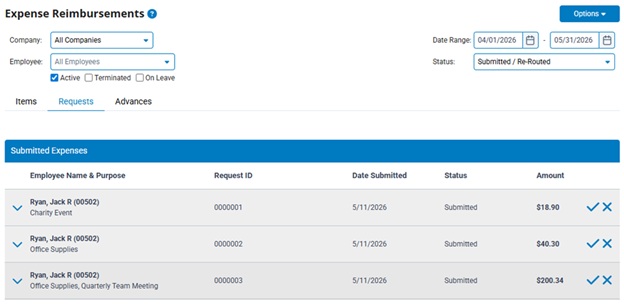
2. Click the row of the expense request to be re-routed.
The Expense RequestExpense Request details page displays.
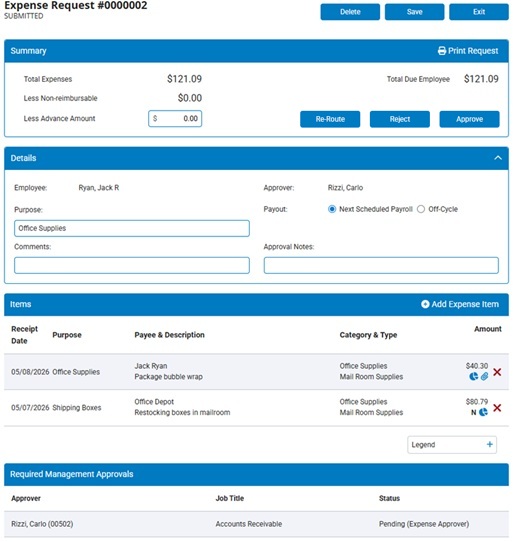
3. Click the Re-RouteRe-Route button.

The Re-Route Expense RequestRe-Route Expense Request page displays with the current list of individuals set to review the respective request.
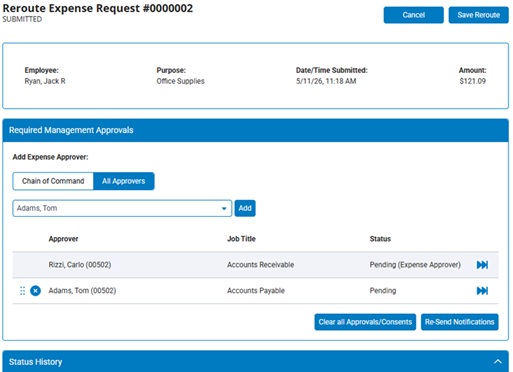
4. To add an additional manager to the list of individuals being asked to provide their consent, locate manager in the employee drop-down list and click the Add button.
Note: Use the available filter to either limit the drop-down list to only show managers who are in the employee's Chain of Command or to show All Approves within your organization.
5. Once multiple managers have been added to the re-route process of the expense request, you may make any of the following changes:
 ) to change the order in which the selected managers are to review the expense request.
 ) next to the respective manager's name.
6. Once satisfied with the changes made, click the Save Re-Route button to record the new re-route workflow of the respective expense request.
Note: If necessary, the following actions may also be performed:
 ) next to the reviewer's name.
Related Help Topics
Reviewing a Submitted Expense Request
Designating a Manager to be bypassed/omitted from the Re-Route Process
Company Configuration - Expense Reimbursements